
Strictly Necessary
Required for core site functions, user authentication, and WooCommerce cart sessions. Permanently enabled and locked.
Native cookie consent suite with Cloudflare edge geo-targeting, early Google Consent Mode v2, granular preferences modal, and visual theming.
WP Zbridge includes a cookie consent banner built for Cloudflare Zaraz and Google Consent Mode v2, with no external libraries. Its script and styles are about 5 KB gzipped. Whether your setup meets the privacy laws that apply to you depends on your configuration; check with your own advisor.
European privacy rules (GDPR, UK GDPR, Swiss FADP and the ePrivacy Directive) generally require consent before setting tracking cookies. If your store only needs a banner for European visitors, EU-only targeting hides it elsewhere.
With EU-only targeting enabled, WP Zbridge decides in the visitor’s browser whether to show the banner:
/cdn-cgi/trace endpoint on your own domain. The result is kept for the browser session.AT, BE, BG, HR, CY, CZ, DK, EE, FI, FR, DE, GR, HU, IE, IT, LV, LT, LU, MT, NL, PL, PT, RO, SK, SI, ES, SE)IS, LI, NO)GB) and Switzerland (CH)Google requires Consent Mode v2 for all traffic from the EEA to support Google Ads conversion tracking and Google Analytics 4 remarketing.
WP Zbridge injects the default consent state at <head> priority 1 (wp_head priority 1) before any tracking tags or scripts can run:
<!-- Injected synchronously in <head> at priority 1 --><script id="wp-zbridge-gcm-default"> window.dataLayer = window.dataLayer || []; function gtag(){dataLayer.push(arguments);} // Inspects existing wp_zaraz_consent cookie immediately // Defaults to denied with wait_for_update for first-time visitors gtag('consent', 'default', { 'ad_storage': 'denied', 'ad_user_data': 'denied', 'ad_personalization': 'denied', 'analytics_storage': 'denied', 'functionality_storage': 'denied', 'security_storage': 'granted', 'wait_for_update': 500 });</script>When a returning visitor has an existing wp_zaraz_consent cookie, the early <head> script synchronously parses it and applies their saved consent choices immediately. This prevents “consent flashing” where tags are briefly denied and then re-granted.
Visitors can choose which categories of cookies and tracking they allow in a preferences dialog.
Strictly Necessary
Required for core site functions, user authentication, and WooCommerce cart sessions. Permanently enabled and locked.
Analytics
Controls traffic measurement, Google Analytics 4, and visitor interaction statistics.
Marketing
Controls conversion pixels and remarketing (Meta, Google Ads, TikTok, Snapchat, Pinterest, Bing, LinkedIn).
Functional
Passed to Google Consent Mode as functionality_storage and in the wp_zaraz_consent_updated event, so your own scripts can respect it. No Zaraz tool is assigned to it.
role="dialog", aria-modal="true", aria-labelledby).Escape key closes the preferences modal without layout shift or page jumps.When a visitor accepts, rejects, or customizes their settings, WP Zbridge synchronizes both tracking engines simultaneously:
gtag('consent', 'update', { ... }) with updated parameters for ad_storage, ad_user_data, ad_personalization, analytics_storage, and functionality_storage.window.wpZbridgeConsent.update(analytics, marketing), which sends google_consent_update to Zaraz and grants or denies the Zaraz consent purposes (wpzan for analytics, wpzmk for marketing). See Zaraz Native Consent Bridge.window.addEventListener('wp_zaraz_consent_updated', function(event) { console.log('Consent updated:', event.detail); // event.detail: { necessary: true, analytics: bool, marketing: bool, functional: bool, version: 1, timestamp: ... }});Customize the appearance to match your brand without editing PHP template files:
prefers-color-scheme).bottom_floating), full-width bottom bar (bottom_bar), or centered modal dialog (modal).:root { --wpz-bg: #18181b; /* Banner background */ --wpz-text: #f4f4f5; /* Body text color */ --wpz-primary: #0284c7; /* Accent button color */ --wpz-radius: 8px; /* Border radius */ --wpz-font-family: inherit; /* Typography stack */}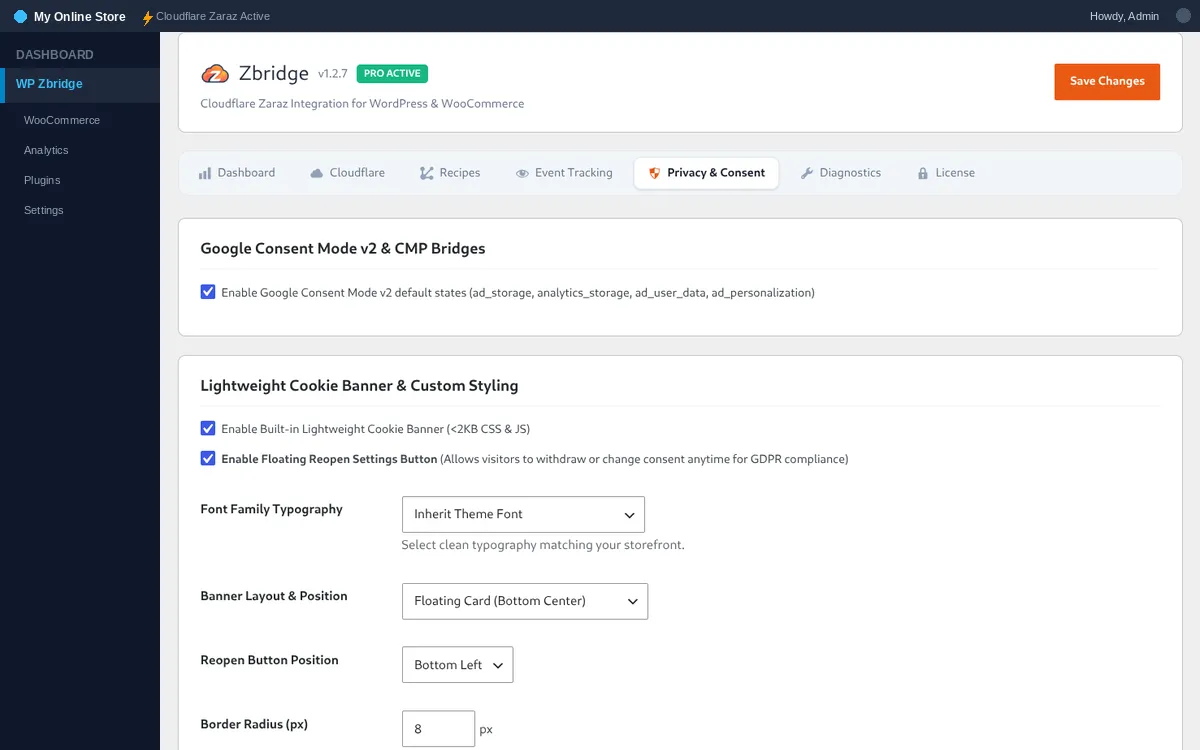
Check which cookies, browser storage and third-party sites your homepage actually uses, so your banner categories and privacy policy match.
How it works:
localStorage and sessionStorage keys that are set, and the third-party sites the page contacted.HttpOnly cookies your browser’s scripts can’t read.The report says how your own consent choice in that browser affects the results. Cookies left from earlier visits in your browser are included.