
Skip to content

Tracking Dashboard & Cloudflare Traffic Stats

See how your store's purchases were delivered and your Cloudflare zone's traffic statistics.

The WP Zbridge Dashboard shows how purchases reached Cloudflare Zaraz and, with Pro, traffic statistics for your Cloudflare zone.


The top of the dashboard checks your setup and lists anything that stops tracking from working. Until setup is complete, its header also shows how many of the three setup steps are done: tool IDs entered, container in Zaraz, and consent set up (collected, or knowingly running without it).

  • Container status: whether the Zaraz container has been exported or synced, and whether your settings changed since then.
  • Missing access tokens: Meta or TikTok configured without the access token their Zaraz tools need.
  • Consent: whether consent is collected, and whether tools are held for consent that no banner or consent plugin asks for.
  • Server fallback path PRO: whether the HTTP Events API path in your live Zaraz configuration matches the site.
  • Rejected requests PRO: tools whose requests from Zaraz were rejected in the last 24 hours, or since your last sync if that is more recent (for example HTTP 401 for a wrong token). Once you fix a token and sync, the warning goes away.

The checks refresh by themselves when you open the dashboard tab and after you save settings, sync or download the container. Recheck runs them again and fetches fresh data from Cloudflare.

Problems come with a button that fixes them where possible: Sync to Zaraz (Pro, with an API token) or Download container for an outdated container, and Add the token to jump to a missing access token under Zaraz Recipes.


With a Cloudflare API token that can read analytics, the dashboard shows the last 24 hours from Cloudflare’s Zaraz Monitoring API: how many actions each tool ran, which events Zaraz received, and requests to your tools that failed. Cloudflare’s figures are cached for up to 10 minutes; the card refreshes together with Setup Health, and Recheck fetches them again.


Totals cover the last 30 days.

  • Orders Tracked: purchases recorded by WP Zbridge, reported either by the browser or by the Pro server fallback.
  • Delivered by Browser: purchases the thank-you page reported, and their share of tracked orders.
  • Sent by Server PRO: purchases the browser did not report (for example because of an ad blocker or a closed tab), which the server sent to Zaraz.
  • Revenue Sent by Server PRO: the value of those orders, and net revenue after refunds.
  • Browser vs Server Delivery PRO: a bar showing the split between the two.
  • Recent Orders PRO: the last 20 orders and how each was delivered.
  • Orders the browser never reported (free edition): paid checkout orders from the last 30 days that never reached Zaraz from the visitor’s browser, for example because of an ad blocker, a closed tab or a payment page that never returned to the store. Only orders placed since you started using WP Zbridge and at least an hour old count; admin-created orders and subscription renewals do not. These are the orders the Pro server fallback sends. Nothing is shown when there are none.

How many orders the server sends depends on your visitors; compare it with your own WooCommerce order count.
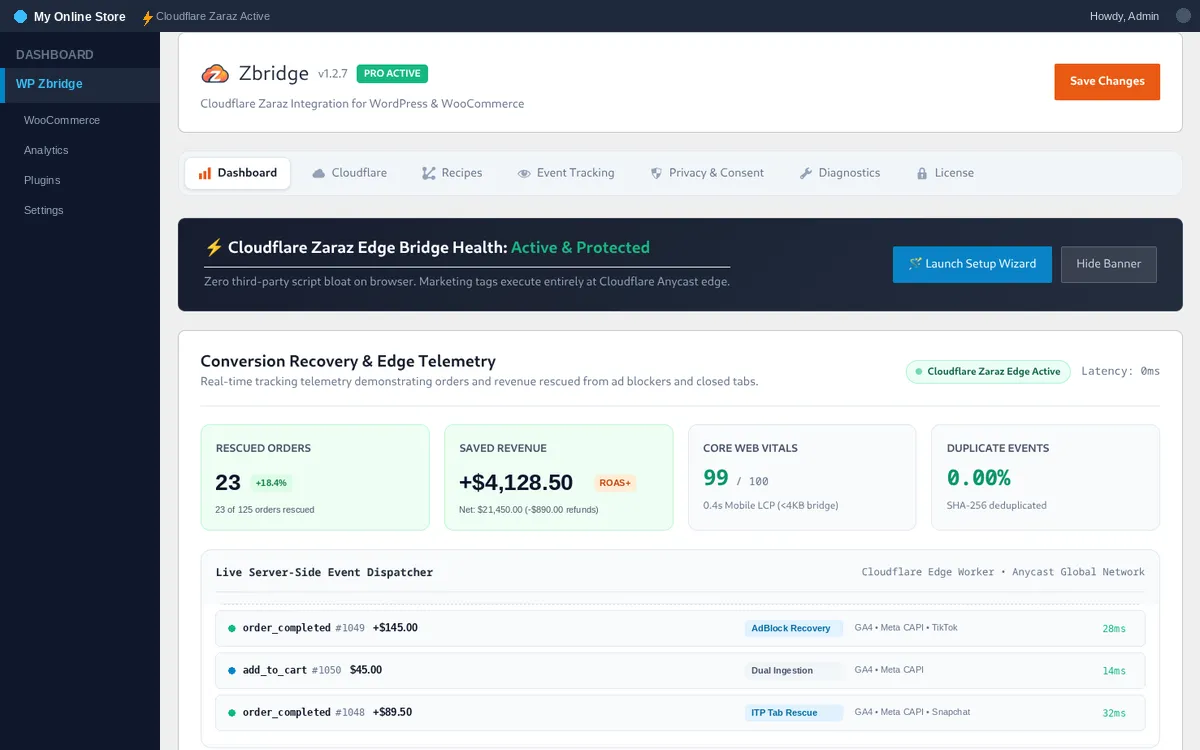
WP Zbridge order delivery dashboard


When your Cloudflare API token can read zone analytics, the dashboard shows the last 24 hours for your zone from Cloudflare’s GraphQL Analytics API:

Total Edge Requests

Requests Cloudflare served for your zone, and how many were page views.

Edge Cache Ratio

The share of requests Cloudflare served from its cache.

Edge Bandwidth Saved

The share of bandwidth served from Cloudflare’s cache instead of your server.

Threats Mitigated

Requests Cloudflare classified as threats for your zone.

These numbers cover your whole zone, not only WP Zbridge.


  • Setup Wizard Shortcut: Re-open the setup wizard at any time to change your connected tools.
  • Active Recipes: See which tools have IDs configured (GA4, Meta, Google Ads, TikTok, Snapchat, Pinterest, Bing, LinkedIn).
  • Diagnostics: Use WP Zbridge > Diagnostics to test the connection to Zaraz or send a simulated test purchase.