
Live Event Simulator
Dispatching simulated test purchases and test refunds to verify end-to-end event flow without creating real orders.
Live Event Simulator
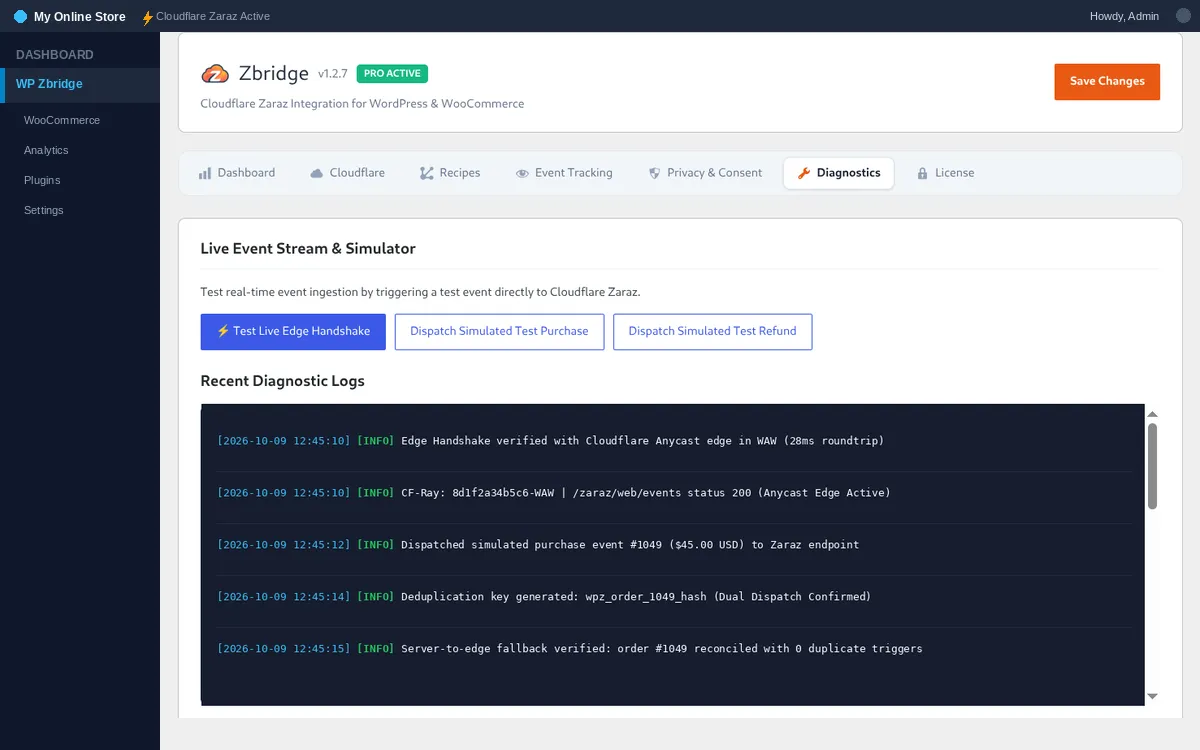
Section titled “Live Event Simulator”The Live Event Simulator allows store owners and developers to verify their Cloudflare Zaraz integration end-to-end without having to place real orders with test credit cards.
Testing Simulated Purchases
Section titled “Testing Simulated Purchases”-
Open Simulator Tab
Section titled “Open Simulator Tab”- In your WordPress admin, go to Zbridge > Diagnostics.
-
Dispatch Simulated Test Purchase
Section titled “Dispatch Simulated Test Purchase”- Click Dispatch Simulated Test Purchase.
- WP Zbridge fires a dual-event:
- Sends
zaraz.ecommerce('Order Completed', ...)in your browser (if Zaraz is loaded on the admin page). - Sends a POST request to your site’s Zaraz HTTP Events API path with a test order and its
event_id(Pro).
- Sends
-
Confirm Verification
Section titled “Confirm Verification”- The status indicator turns green:
✓ Simulated purchase event dispatched successfully! (HTTP 200). - Check Meta Test Events or GA4 DebugView to see the test purchase arrive.
- The status indicator turns green:
Testing Simulated Refunds
Section titled “Testing Simulated Refunds”Click Dispatch Simulated Test Refund to send a test Order Refunded event ($49.00) to your Zaraz HTTP Events API path (Pro).
Live Edge Handshake Verifier
Section titled “Live Edge Handshake Verifier”Click ⚡ Test Live Edge Handshake on either the Dashboard or Simulator tab. WP Zbridge sends a lightweight test ping to the Cloudflare Zaraz endpoint and reports:
- Roundtrip Latency (ms): Total network time from WordPress origin to the nearest Cloudflare Anycast edge.
- Edge Location (Colo): The 3-letter IATA airport code of the Cloudflare data center intercepting the request (e.g.
WAW,FRA,LHR,IAD). - Interception Confirmation: Confirms your domain is properly proxied through Cloudflare with Zaraz active and published.
Setup Wizard Visibility & Relaunch Controls
Section titled “Setup Wizard Visibility & Relaunch Controls”Under the Diagnostics tab, you also have direct control over the onboarding wizard:
- Show Setup Wizard in Admin Menu: Toggle whether the wizard appears in your WordPress sidebar navigation. When unchecked, the menu stays completely clean.
- Relaunch Setup Wizard: Click anytime to reopen the step-by-step walkthrough.