
Client-Side JavaScript API
Full reference for the vanilla JS event bridge (about 3 KB gzipped) exposed via window.wpZbridgeBridge.
Client-Side JavaScript API
Section titled “Client-Side JavaScript API”WP Zbridge injects a lightweight, non-blocking client-side bridge script (assets/js/zaraz-bridge.js) that safely coordinates interaction events with Cloudflare Zaraz.
The public API is exposed on the global window object as window.wpZbridgeBridge (with a backwards-compatible alias window.wpZarazBridge).
Global Object
Section titled “Global Object”window.wpZbridgeBridge = { track: function(eventName, payload) {}, ecommerce: function(actionName, payload) {}, flush: function() {}};If window.zaraz has not yet finished bootstrapping on the page, calls made to window.wpZbridgeBridge are automatically queued in an in-memory buffer and flushed once Zaraz initializes.
Methods
Section titled “Methods”track(eventName, payload)
Section titled “track(eventName, payload)”Dispatches a standard tracking event to Zaraz.
- Parameters:
eventName(string, required): The name of the event (e.g.'form_submit','file_download'). Use lowercase with underscores so GA4 accepts and reports it cleanly.payload(object, optional): Key-value dictionary containing custom properties.
// Example: Custom banner interactionwindow.wpZbridgeBridge.track('promo_banner_click', { banner_id: 'summer_sale_2026', position: 'homepage_hero'});ecommerce(actionName, payload)
Section titled “ecommerce(actionName, payload)”Dispatches an e-commerce action conforming to Zaraz’s e-commerce event schema.
- Parameters:
actionName(string, required): E-commerce action name (a Zaraz e-commerce event name, e.g.'Product Viewed','Product Added','Product Removed','Order Completed','Order Refunded').payload(object, required): Structured e-commerce payload matching the Zaraz OpenAPI schema.
// Example: Custom dynamic product viewwindow.wpZbridgeBridge.ecommerce('Product Viewed', { product_id: 1042, name: 'Anycast Edge Cloud Subscription', price: 49.00, currency: 'USD', category: 'Hosting & Infrastructure'});flush()
Section titled “flush()”Immediately flushes any buffered events to window.zaraz. Typically invoked automatically by DOM event listeners.
window.wpZbridgeBridge.flush();Automatic Interaction Listeners
Section titled “Automatic Interaction Listeners”The client script automatically listens for and dispatches the following browser interactions without any extra configuration. Each listener can be switched on or off under WP Zbridge → Event Tracking:
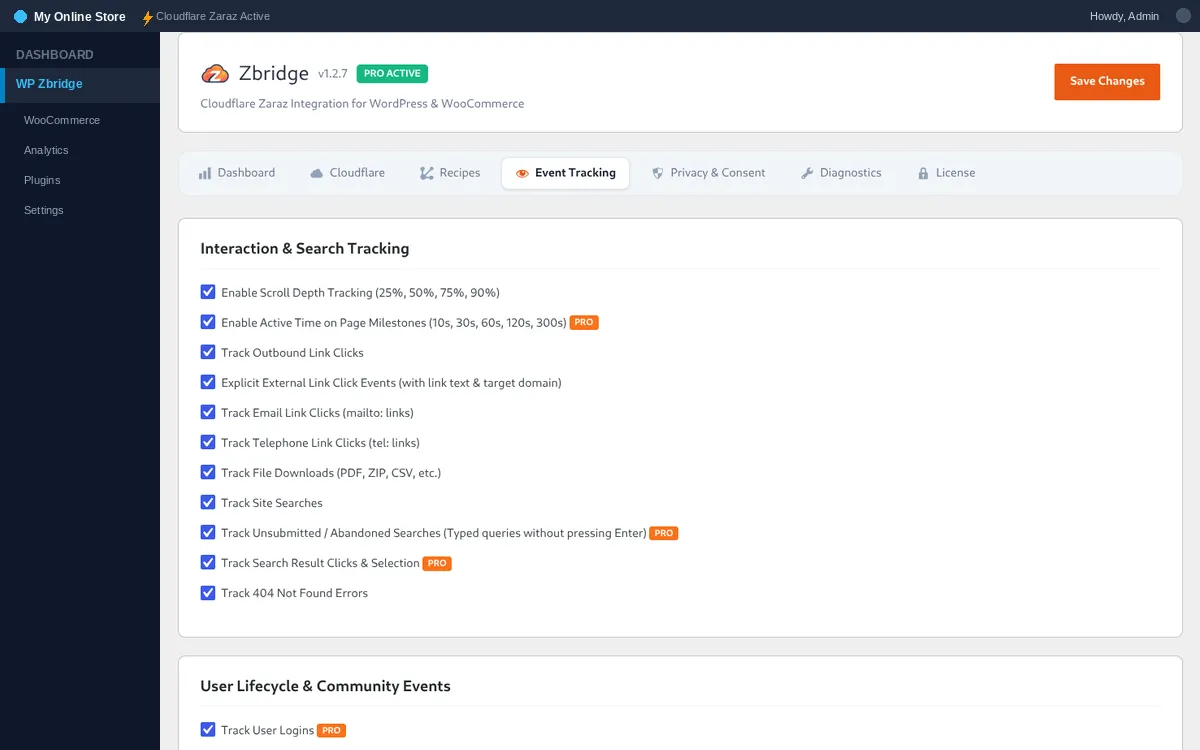
- Scroll Depth Tracking:
scrollwithpercent_scrolledat 25%, 50%, 75%, and 90%. - Active Time on Page:
time_on_pagemilestones fire at 10s, 30s, 60s, 120s, and 300s of active engagement. The timer pauses automatically whenever the browser tab is hidden (document.visibilityState === 'hidden'). - Outbound Link Clicks:
clickwithlink_url,link_domainandoutbound: 'true'for links to other domains. - Email Link Clicks:
click_emailwith only theemail_domain(no address). - Phone Link Clicks:
click_phone, without the number. - File Downloads:
file_downloadwithfile_name,file_extensionandlink_urlfor.pdf,.zip,.csv,.docx,.xlsx,.mp3,.mp4links. - Site Search: the Zaraz e-commerce event
Products Searchedwithqueryon search results (GA4 recordsview_search_results, Meta and TikTokSearch), plussearch_unsubmittedandsearch_result_clickin Pro. - User Lifecycle: Flash cookies capture backend
loginandsign_upevents with user role attribution and fire on subsequent page load. - WordPress Comments: Intercepts comment submissions and dispatches
comment_submitwith post and comment IDs. - Lead Form Submissions:
form_submitwithform_idandform_pluginfor submissions across Contact Form 7, WPForms, Gravity Forms, Fluent Forms, Elementor Forms, and custom generic HTML forms. - 404 Errors:
page_not_foundwithpage_path.